Remote Sources
Remote Media Sources
LoFiBox keeps a clear source / remote boundary: source owns configuration, authentication, capabilities, and lifecycle; remote owns browsing, search, recent items, favorites, and stream resolution.
Supported Source Types
| Category | Source types | Use |
|---|---|---|
| Media servers | Jellyfin, Emby, OpenSubsonic / Navidrome, Subsonic | Directories, search, recent playback, favorites, stream resolution. |
| Direct streams | Direct URL, Internet Radio, Playlist Manifest | Radio, single URLs, M3U/PLS-style playlists. |
| Streaming protocols | HLS, DASH | Adaptive streams, live audio, remote audio segments. |
| File sharing | SMB, NFS, WebDAV, FTP, SFTP | Remote file trees as media sources. |
| LAN discovery | DLNA / UPnP | Home-network media device browsing and playback. |
Configure a Source Profile
Profiles store non-secret configuration such as kind, id, name, base_url, username, credential_ref, and TLS policy. Secrets must live in the credential store.
printf '%s' "$JELLYFIN_PASSWORD" | lofibox credentials set jellyfin-home --password-stdin

lofibox source add jellyfin \
  --id jellyfin-home \
  --name "Home Jellyfin" \
  --base-url https://media.local:8096 \
  --username vicliu \
  --credential-ref jellyfin-home \
  --verify-peer true \
  --allow-self-signed false
Check Connection and Capabilities
After adding a profile, probe it first. auth-status and capabilities are useful for scripts that need to decide whether a source is usable and which directory or stream features it supports.
lofibox source list --json
lofibox source show jellyfin-home --json
lofibox source probe jellyfin-home
lofibox source auth-status jellyfin-home --json
lofibox source capabilities jellyfin-home --json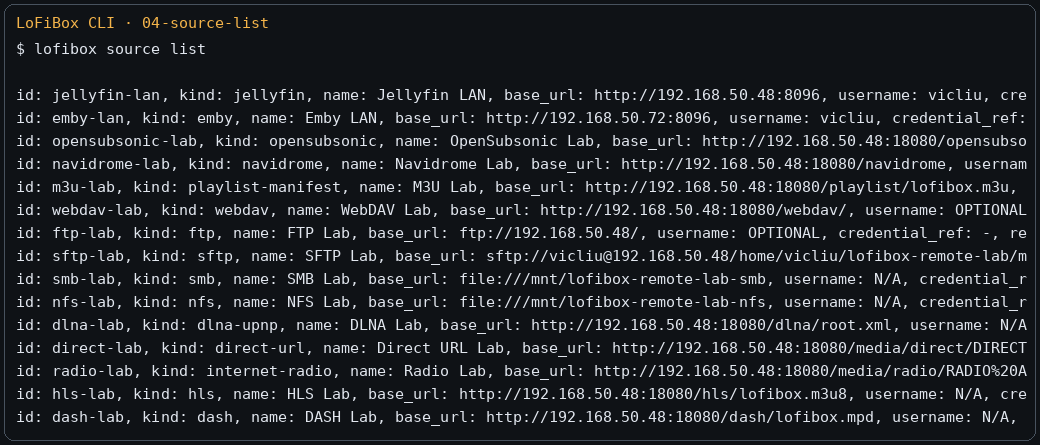
Browse and Search Remote Content
Remote commands are used only after a profile can connect. Browsing results and local-library results are converted into the same MediaItem model, so GUI/TUI/CLI can play them consistently.
lofibox remote browse jellyfin-home
lofibox remote browse jellyfin-home /artists
lofibox remote browse jellyfin-home /albums
lofibox remote browse jellyfin-home /playlists
lofibox remote browse jellyfin-home /stations
lofibox remote recent jellyfin-home
lofibox remote favorites jellyfin-home
lofibox remote search jellyfin-home "outkast"
Resolve Streams and Play
resolve / stream-info return redacted URLs, codec, bitrate, seekable/live flags, buffer state, and diagnostics. Playback still goes through the playback session; remote commands do not bypass the runtime.
lofibox remote resolve jellyfin-home item-123 --json
lofibox remote stream-info jellyfin-home item-123 --json
lofibox play --source jellyfin-home --item item-123
lofibox now --fields playback.status,playback.title,remote.connection_status --json
Safety Constraints
- Remote profiles store credential_ref, not raw passwords or tokens.
- CLI and TUI display only redacted URLs.
- Authentication failures return explicit exit codes and structured errors for automation repair.
- Remote streams enter the unified playback pipeline, keeping EQ, lyrics projection, and runtime diagnostics consistent with local playback.